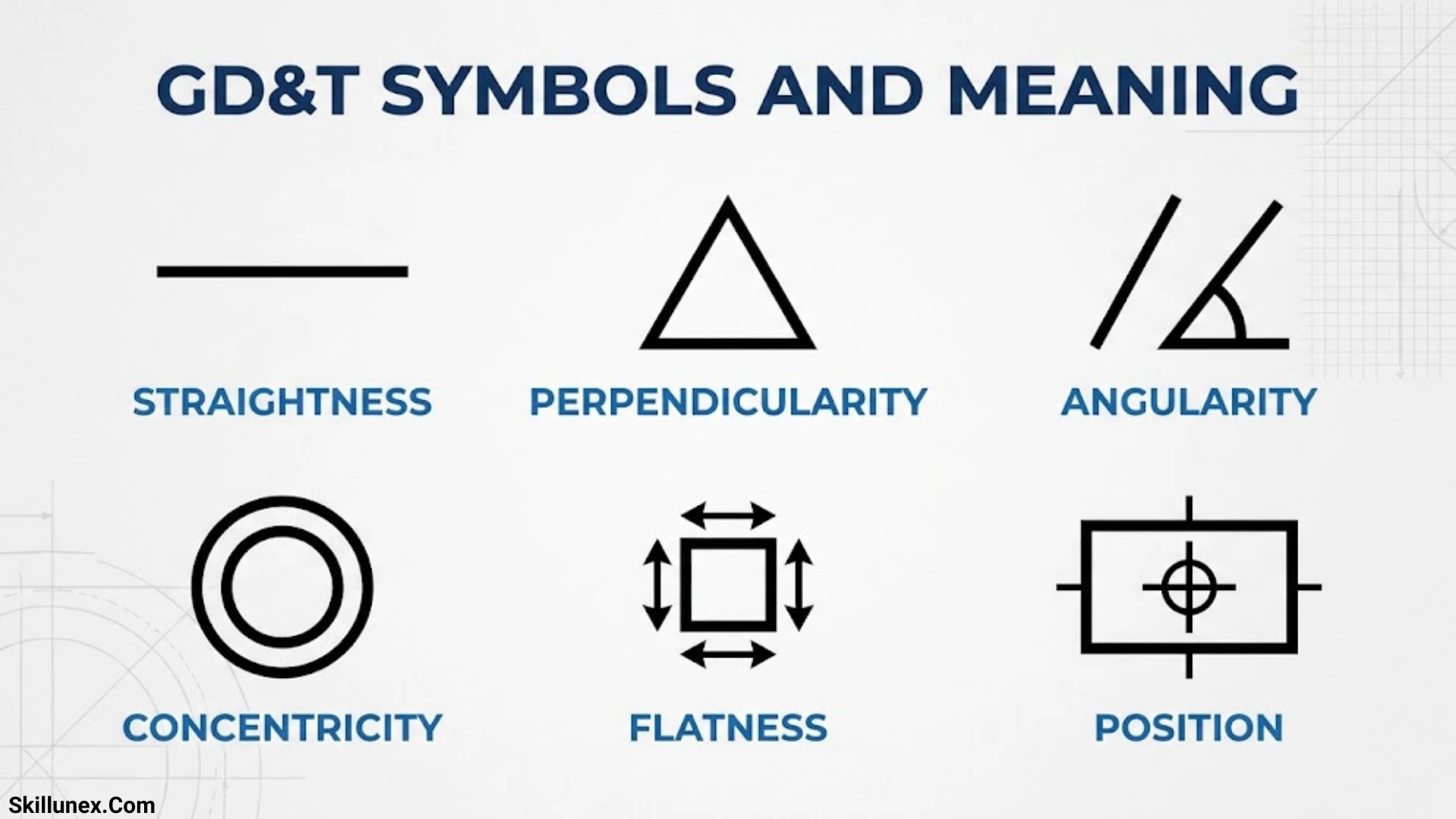
GD&T symbols and meaning are essential for understanding engineering drawings, manufacturing designs, and product specifications. Geometric Dimensioning and Tolerancing (GD&T) uses standardized symbols to communicate the required shape, size, position, and orientation of a part. If you work in engineering, machining, or quality inspection, understanding these symbols can help you read technical drawings more accurately.
When you learn GD&T symbols, you can better understand how individual parts should be manufactured and inspected. You will discover symbols for flatness, parallelism, perpendicularity, position, circularity, and other geometric controls. These symbols help you communicate design requirements clearly, reduce manufacturing errors, and ensure that parts fit and function as intended.
In this guide, I will explain the most important GD&T symbols and their meanings in simple terms. You will learn how to recognize each symbol, understand its purpose, and interpret it on engineering drawings. If you are a beginner or an experienced professional, this guide will help you build confidence when working with GD&T specifications.
What Is GD&T?
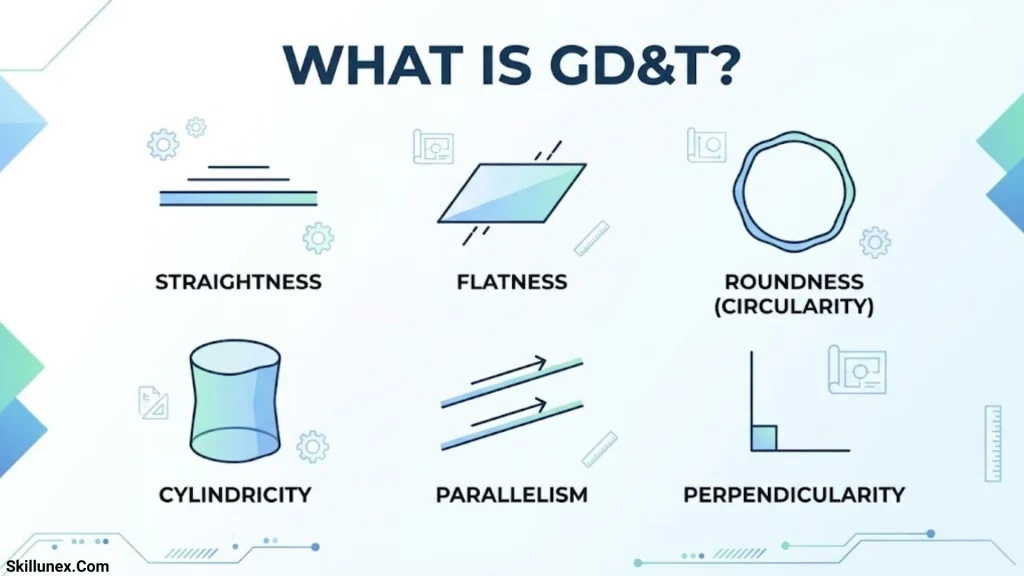
GD&T stands for Geometric Dimensioning and Tolerancing. It is an engineering language that uses standardized symbols, dimensions, tolerance zones, and reference systems to define acceptable variation in manufactured parts.
GD&T communicates more than the size of a feature. It can control whether a surface is flat, whether a hole is correctly positioned, whether two surfaces are parallel, or whether a rotating component has excessive runout.
For example, a shaft might have a specified diameter of 20 mm. That dimension controls the shaft’s size, but it does not automatically define the shaft’s straightness or its alignment with another feature. Additional geometric tolerances may be required to control those characteristics.
Why Is GD&T Important?
GD&T plays an important role in producing consistent, functional, and interchangeable components.
- Clear engineering communication: Standardized symbols help designers, manufacturers, and inspectors interpret requirements consistently.
- Improved product quality: Geometric controls address variations that can affect fit, function, and performance.
- Reliable assembly: Position and orientation tolerances help ensure that mating components align correctly.
- Reduced production costs: Functional tolerances can avoid unnecessarily restrictive manufacturing requirements.
- More effective inspection: Clearly defined geometric requirements help quality teams select suitable measuring methods.
- Better design documentation: GD&T communicates critical relationships between features more precisely than dimensions alone in many applications.
Where Is GD&T Used?
GD&T is used in industries where component geometry affects product performance, safety, or assembly.
Common applications include:
- Automotive components, including engine parts, brackets, and transmission housings.
- Aerospace parts, including turbine components and structural assemblies.
- CNC-machined components, including shafts, holes, and precision fixtures.
- Medical devices, including surgical instruments and precision equipment.
- Industrial machinery, including bearings, guides, and mounting systems.
- Electronic enclosures, connectors, and precision mechanical assemblies.
GD&T Standards: ASME and ISO
GD&T interpretation depends on the standard specified for the drawing.
ASME Y14.5 is widely used in the United States and defines dimensioning and tolerancing practices, including geometric tolerancing.
ISO GPS standards are used internationally and cover geometrical product specifications, including geometrical tolerancing.
Although ASME and ISO systems share many symbols and principles, their rules are not always identical. Always identify the applicable standard and edition before interpreting a drawing or conducting an inspection.
GD&T Symbols and Their Meanings
GD&T symbols identify the geometric characteristic being controlled. They are commonly organized into five groups: form, profile, orientation, location, and runout.
The traditional GD&T reference chart contains 14 geometric characteristic symbols. However, the applicable list depends on the governing standard and edition. In particular, concentricity and symmetry are legacy controls that were removed from ASME Y14.5-2018.
| Category | Symbol name | Meaning |
| Form | Straightness | Controls the straightness of a line element or a derived feature line, as applicable |
| Form | Flatness | Controls the flatness of a surface |
| Form | Circularity (roundness) | Controls the roundness of individual circular cross-sections |
| Form | Cylindricity | Controls the overall form of a cylindrical surface |
| Profile | Profile of a line | Controls a two-dimensional profile |
| Profile | Profile of a surface | Controls a three-dimensional surface |
| Orientation | Angularity | Controls orientation at a specified angle |
| Orientation | Perpendicularity | Controls orientation at 90 degrees |
| Orientation | Parallelism | Controls parallel orientation relative to a datum |
| Location | Position | Controls the location of a feature relative to a defined reference system |
| Location, legacy | Concentricity | Controls the relationship between derived median points and a datum axis under legacy rules |
| Location, legacy | Symmetry | Controls the relationship between derived median points and a datum plane under legacy rules |
| Runout | Circular runout | Controls variation at individual circular sections during rotation |
| Runout | Total runout | Controls variation over an entire surface during rotation |
The symbol names are often displayed as small graphical icons in engineering drawings rather than as ordinary text. Their exact appearance should be taken from the applicable standard or an authoritative GD&T reference.
Form Tolerance Symbols
Form tolerances control the shape of individual features. They generally do not require a datum reference because they evaluate the feature’s form rather than its orientation or location relative to another feature.
The four main form controls are straightness, flatness, circularity, and cylindricity.
Profile Tolerance Symbols
Profile tolerances control the shape of a line or surface. Depending on how the tolerance is specified, a profile control can also control a feature’s location and orientation relative to datums.
The two profile controls are profile of a line and profile of a surface.
Orientation Tolerance Symbols
Orientation tolerances control the angular relationship between a feature and a reference. They commonly use datum references.
The three main orientation controls are angularity, perpendicularity, and parallelism.
Location Tolerance Symbols
Location tolerances define where a feature is allowed to be positioned relative to a datum reference frame or other theoretically exact geometry.
Position is the principal modern control in this group. Concentricity and symmetry may appear on older drawings, but they have been removed from ASME Y14.5-2018.
Runout Tolerance Symbols
Runout tolerances control variation relative to a datum axis when a part is rotated. They are particularly useful for shafts, spindles, bearing surfaces, and other rotating components.
The two main runout controls are circular runout and total runout.
Form GD&T Symbols and Examples
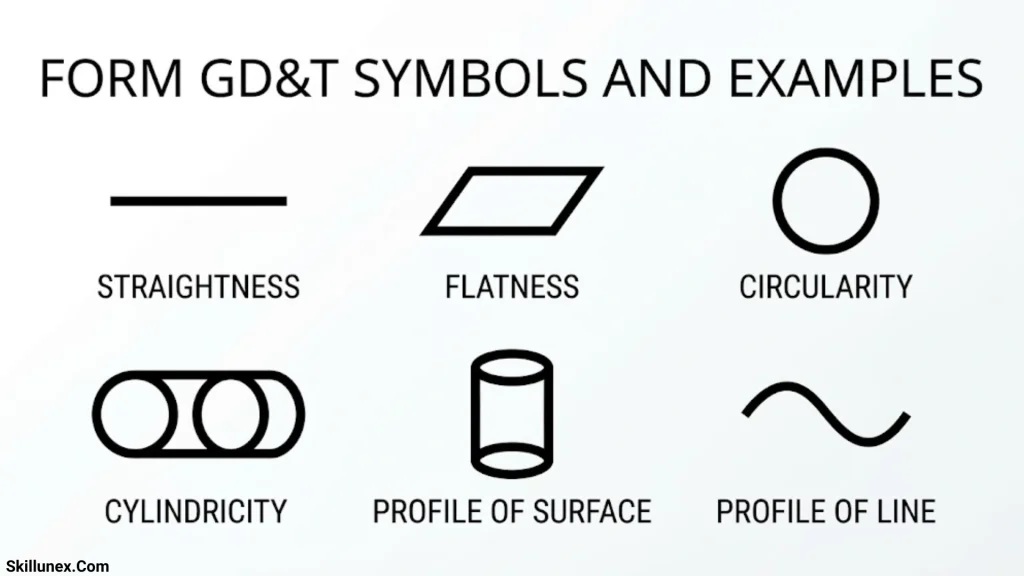
Form tolerances help ensure that a feature has the required shape. They are particularly useful when geometric variation affects sealing, sliding, bearing contact, or assembly.
Straightness Symbol and Meaning
Straightness controls how much a line element or a derived feature line may deviate from a theoretically straight condition.
For a surface, straightness evaluates a line element on that surface. When applied to the derived median line of a feature of size, it can control the feature’s axis or centerline within the specified tolerance zone.
Example: A long guide shaft may require a straightness tolerance to prevent excessive deviation along its length.
Common applications:
- Guide rods and shafts
- Linear rails
- Sliding components
- Long machined surfaces
Straightness does not automatically control the orientation of a feature relative to a datum. If orientation is important, an additional appropriate control may be necessary.
Flatness Symbol and Meaning
Flatness controls how much a surface may depart from a theoretically flat plane. The controlled surface must lie between two parallel planes separated by the specified tolerance.
Example: A mounting plate may have a flatness tolerance of 0.05 mm. The entire controlled surface must fit within the corresponding tolerance zone.
Common applications:
- Machine bases
- Mounting plates
- Sealing surfaces
- Precision fixtures
- Gasket-contact surfaces
Flatness controls surface form, not its orientation relative to another surface. A flat surface can still be tilted relative to a datum.
Circularity Symbol and Meaning
Circularity, also called roundness, controls how close a circular cross-section is to a perfect circle.
Each controlled circular cross-section must fit between two concentric circles separated by the specified tolerance.
Example: A bearing journal may require circularity control to ensure that its cross-section is sufficiently round.
Common applications:
- Bearing journals
- Pistons
- Cylindrical shafts
- Rotating components
Circularity does not control the entire cylindrical surface’s straightness or overall form. Cylindricity may be more suitable when the full cylindrical surface must be controlled.
Cylindricity Symbol and Meaning
Cylindricity controls the overall form of a cylindrical surface. The surface must fit between two coaxial cylinders separated by the specified tolerance.
It evaluates the combined form of the cylindrical surface, including circular and longitudinal variations.
Example: A precision roller may require a cylindricity tolerance to maintain consistent contact across its working surface.
Common applications:
- Precision rollers
- Hydraulic cylinders
- Sliding shafts
- Cylindrical sealing surfaces
- Precision bearing components
Cylindricity is generally more comprehensive than circularity because it evaluates the complete controlled cylindrical surface rather than individual cross-sections alone.
Profile GD&T Symbols and Examples
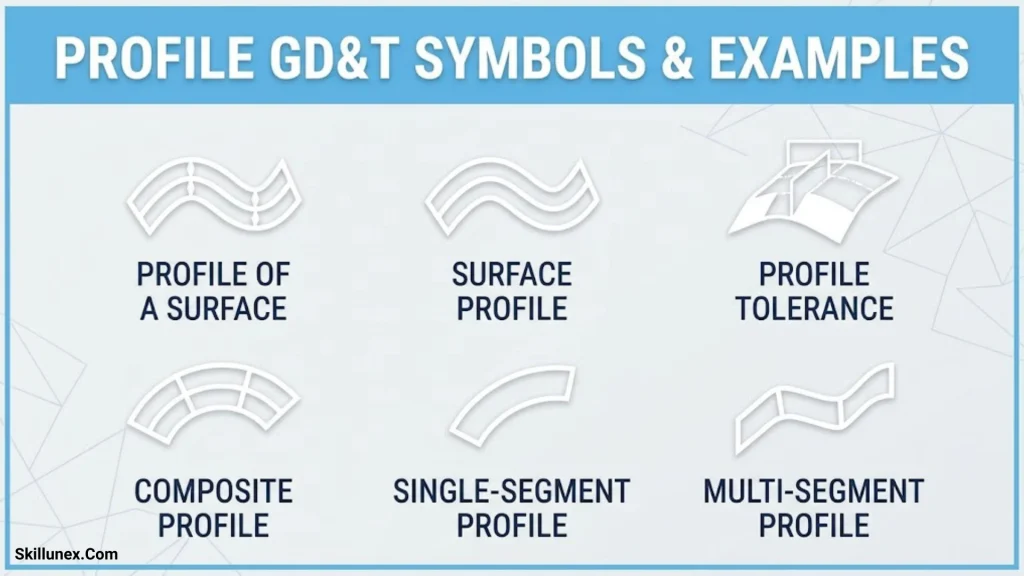
Profile tolerances are useful for controlling curved, irregular, molded, cast, or otherwise complex geometry. They can be particularly valuable when a component must match a theoretically exact contour.
Profile of a Line Symbol and Meaning
The profile of a line controls a two dimensional cross-section of a feature. The tolerance zone is typically formed by two boundary lines following the true profile.
Example: A cam profile may require a line-profile tolerance to ensure that the specified cross section follows its intended contour.
Common applications:
- Cam profiles
- Curved machined edges
- Cross-sectional contours
- Molded part sections
The drawing must identify the applicable profile and how the tolerance relates to the nominal geometry.
Profile of a Surface Symbol and Meaning
The profile of a surface controls a three-dimensional surface. The entire controlled surface must remain within a tolerance zone around the theoretically exact surface.
Depending on the specification, the control may address form alone or also control the surface’s location and orientation relative to datums.
Example: A complex molded panel may require a surface-profile tolerance to ensure that its contour fits neighboring components.
Common applications:
- Automotive body panels
- Turbine blades
- Molded plastic parts
- Complex castings
- Aerospace surfaces
Profile tolerances can be useful when several geometric requirements need to be communicated through a single, properly defined control.
Orientation GD&T Symbols and Examples
Orientation tolerances control how a feature is aligned relative to a datum. They are commonly used when parts must mate, slide, or assemble in a specific angular relationship.
Angularity Symbol and Meaning
Angularity controls the orientation of a feature at a specified angle relative to a datum. The intended angle is usually neither 0 nor 90 degrees.
Example: An angled mounting face may need to remain at 30 degrees relative to a datum surface within the specified tolerance.
Common applications:
- Angled brackets
- Sloped mounting surfaces
- Tapered components
- Machine-tool parts
Angularity controls orientation, not the feature’s size. The drawing must define the nominal angle and the appropriate geometric tolerance.
Perpendicularity Symbol and Meaning
Perpendicularity controls whether a surface, axis, or center plane is oriented at 90 degrees relative to a datum.
Example: A mounting hole may require perpendicularity relative to a base surface so that the assembled fastener aligns correctly.
Common applications:
- Drilled holes
- Machine housings
- Vertical mounting faces
- Precision fixtures
- Assembly interfaces
The tolerance zone depends on the controlled feature and the way the requirement is specified. A surface may use a planar tolerance zone, while an axis may use a cylindrical zone.
Parallelism Symbol and Meaning
Parallelism controls whether a surface, axis, or center plane is parallel to a datum.
Example: Two guide surfaces may require parallelism to help a sliding component move consistently without binding.
Common applications:
- Guide rails
- Machine beds
- Opposing mounting faces
- Shaft and bearing arrangements
Parallelism requires a reference datum because the controlled orientation must be evaluated relative to a defined reference.
Location GD&T Symbols and Examples
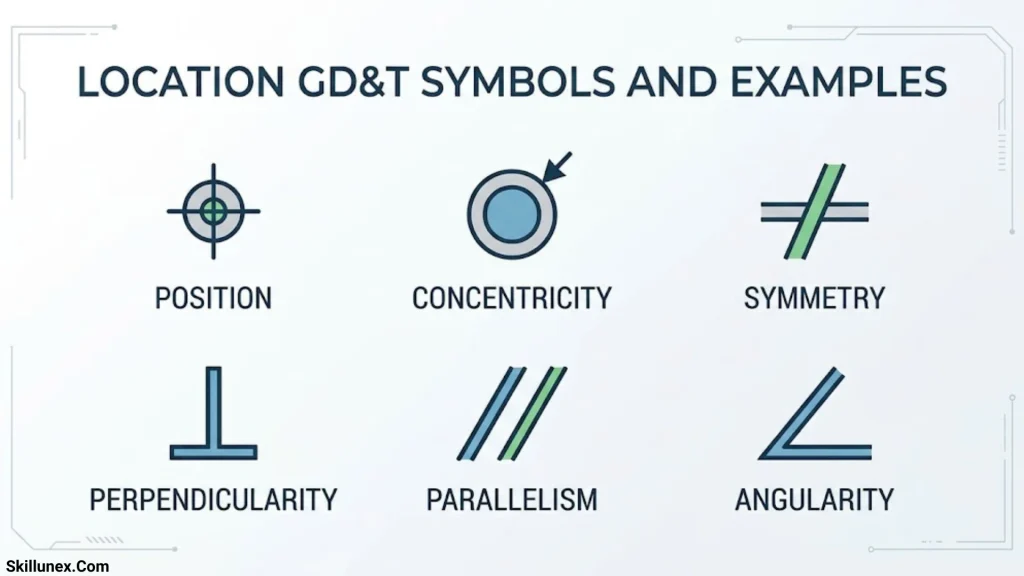
Location controls are used when the relative positions of features are important to assembly or function. The position control is especially common in modern engineering drawings.
Position Symbol and Meaning
Position controls the permitted location of a feature, such as a hole, pin, slot, or pattern of holes, relative to a defined reference system.
For a cylindrical feature, the tolerance zone is commonly cylindrical. The feature’s actual location must satisfy the specified zone and applicable datum requirements.
Example: A mounting plate may contain four bolt holes. A position tolerance helps ensure that the holes align with the matching holes in another component.
Common applications:
- Bolt-hole patterns
- Dowel-pin holes
- Connector locations
- Assembly features
- Precision mounting plates
Position can be more effective than relying on separate coordinate tolerances when the relationship between features is critical. The drawing’s basic dimensions, datum references, and modifiers determine the complete requirement.
Concentricity: Meaning and Modern Usage
Concentricity is a legacy GD&T control that evaluates the relationship between the derived median points of a feature and a datum axis under the applicable standard.
It is often confused with coaxiality, circularity, or runout, but these concepts describe different geometric requirements.
Example: An older engineering drawing may specify concentricity between two cylindrical features.
For new designs following ASME Y14.5-2018, concentricity has been removed as a geometric characteristic. Depending on the functional requirement, position, runout, or another appropriate control may be preferable.
Do not automatically replace a concentricity requirement with another control without reviewing the design intent and the applicable standard.
Symmetry: Meaning and Modern Usage
Symmetry is another legacy GD&T control. Under older rules, it evaluates the relationship between derived median points of a feature and a datum plane.
Example: An older drawing may use symmetry to describe the relationship between a slot and a central datum plane.
Symmetry has been removed from ASME Y14.5-2018. For current designs, position or profile may be appropriate alternatives, depending on the geometry and the intended function.
Runout GD&T Symbols and Examples
Runout controls are commonly used for rotating components. They help define how much a surface may vary when the part rotates around a datum axis.
Circular Runout Symbol and Meaning
Circular runout controls variation at each circular cross-section as a part rotates around its datum axis.
Inspection commonly involves rotating the part and measuring the specified surface with an appropriate instrument, such as a dial indicator.
Example: A shaft may require circular runout control at a bearing journal to limit variation at that location during rotation.
Common applications:
- Rotating shafts
- Bearing journals
- Pulleys
- Spindles
- Circular sealing surfaces
Circular runout evaluates individual circular sections rather than the entire surface at once.
Total Runout Symbol and Meaning
Total runout controls variation across the entire controlled surface as the part rotates around its datum axis. It evaluates surface variation over the full length or extent of the controlled feature.
Example: A precision shaft may require total runout control across a cylindrical bearing surface to help maintain consistent rotation.
Common applications:
- Precision spindles
- Rotating shafts
- Cylindrical sealing surfaces
- High-speed rotating assemblies
- Precision rollers
The main difference is that circular runout evaluates each circular section, while total runout evaluates the entire controlled surface during rotation. The required setup and measurement method must follow the drawing and applicable standard.
How to Read a GD&T Feature Control Frame
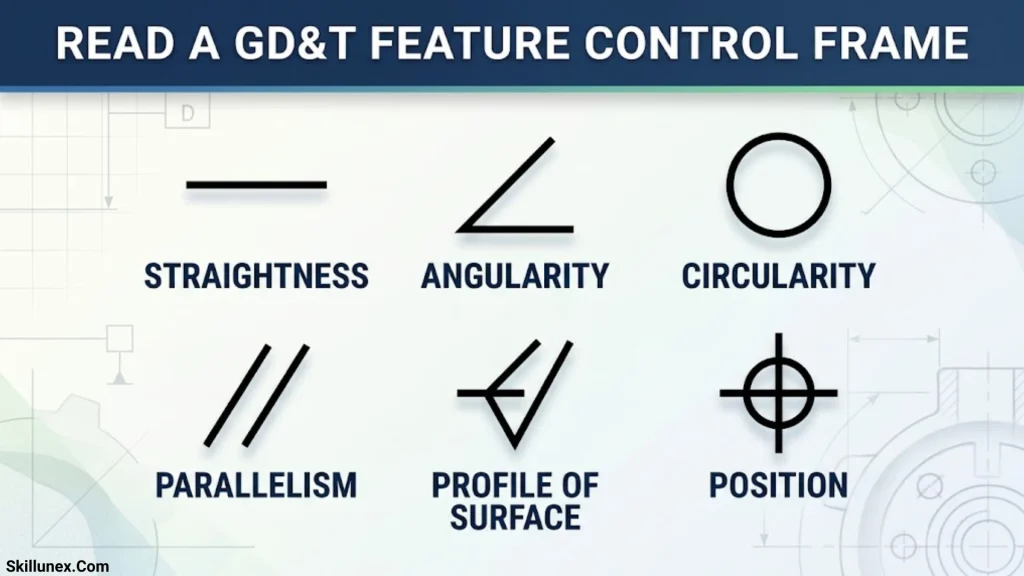
A feature control frame is a rectangular box divided into compartments. It communicates the geometric characteristic, tolerance value, applicable modifiers, and datum references for a controlled feature.
Understanding this frame is one of the most important skills for interpreting GD&T drawings.
Main Elements of a Feature Control Frame
A feature control frame may contain the following elements:
- Geometric characteristic: Identifies the control, such as position, flatness, or perpendicularity.
- Tolerance value: Specifies the allowable geometric variation.
- Tolerance-zone modifier: May indicate a material condition, such as maximum material condition, where permitted.
- Datum references: Identify the reference features used to establish the datum reference frame.
Not every feature control frame contains all these elements. For example, flatness typically does not require a datum reference, while position commonly uses datum references.
Example: Interpreting a Position Tolerance
Imagine a drawing that specifies a hole with a position tolerance of 0.20 mm relative to datums A, B, and C.
To interpret this requirement, consider the following:
- The hole’s size is controlled by its size dimension and applicable size limits.
- The position tolerance controls the permitted location of the hole relative to the specified datum reference frame.
- The basic dimensions define the theoretically exact location where applicable.
- The datum order establishes the reference system used for evaluation.
- Any material condition modifier affects the interpretation of the tolerance where the standard permits it.
The actual hole must meet both its size requirement and its applicable geometric requirements. A hole can have an acceptable diameter but still fail its position tolerance.
Basic Dimensions and Their Role
Basic dimensions define theoretically exact values, such as the nominal distance or angle between features. They are commonly used with geometric tolerances to establish the ideal geometry.
For example, the nominal center-to-center spacing between two holes may be shown as a basic dimension. The position tolerance then defines the permitted variation from the theoretically exact locations.
The complete interpretation depends on the drawing, the feature control frame, and the governing standard.
Understanding Datums in GD&T
A datum is a theoretically exact reference used to establish a coordinate system or reference for evaluating geometric requirements. In practice, datum features on a physical part are used to establish the required reference according to the applicable standard.
Datum references are especially important when features must align with mating components or when a part is inspected in a defined setup.
Primary Datum
The primary datum is the first reference established in the datum reference frame. It provides the initial constraint for locating and orienting the part.
Example: The bottom mounting surface of a component may serve as the primary datum when that surface rests against a fixture during assembly.
Secondary Datum
The secondary datum is established after the primary datum. It adds constraints to locate or orient the part more precisely.
Example: A side surface may act as the secondary datum to control lateral positioning.
Tertiary Datum
The tertiary datum provides the additional reference needed to complete the datum reference frame when required.
Example: An end surface may serve as the tertiary datum to establish the final locating direction.
The correct datum selection should reflect the part’s functional requirements and how the component is assembled, located, or inspected.
GD&T Material Condition Modifiers
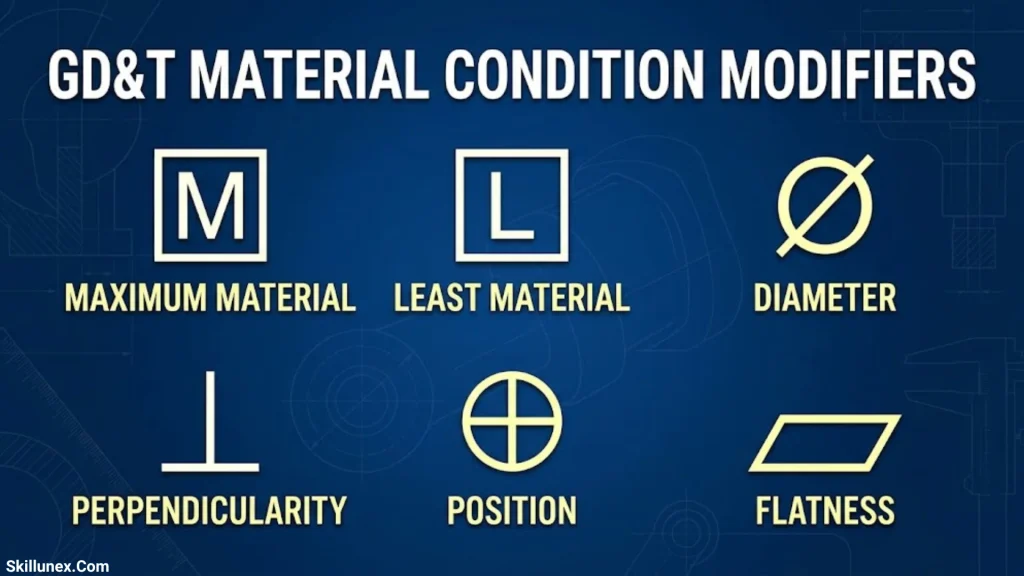
Material condition modifiers describe how a geometric tolerance relates to the size of a feature. Their use depends on the characteristic, feature type, and applicable standard.
Maximum Material Condition (MMC)
Maximum material condition is the size condition of a feature that contains the greatest amount of material.
- For an external feature, such as a pin, MMC is generally its largest permitted size.
- For an internal feature, such as a hole, MMC is generally its smallest permitted size.
When a geometric tolerance is specified at MMC and the control permits it, bonus tolerance may become available as the actual feature departs from MMC.
Example: If a hole is larger than its MMC size, an applicable position tolerance at MMC may allow additional positional variation while preserving the required functional boundary.
Least Material Condition (LMC)
Least material condition is the size condition containing the least amount of material.
- For an external feature, it is generally the smallest permitted size.
- For an internal feature, it is generally the largest permitted size.
LMC can be useful when the amount of material remaining near an edge or between features is important.
Regardless of Feature Size (RFS)
Regardless of feature size is a familiar term in legacy GD&T explanations. Under ASME Y14.5-2009 and later editions, RFS is generally the default for applicable geometric tolerances unless another material condition modifier is specified. It is not normally shown as a separate modifier in those editions.
Always use the governing standard and edition to interpret the drawing correctly.
GD&T Symbols Compared With Conventional Tolerances
Conventional dimensional tolerancing and GD&T serve related but different purposes. A complete engineering drawing often requires both.
| Comparison | Conventional tolerancing | GD&T |
| Main purpose | Controls size and dimensional variation | Controls geometric variation and relationships |
| Typical requirements | Length, width, diameter, and distance | Form, orientation, location, profile, and runout |
| Reference system | Often based on dimensions and extension lines | Can use datums and a datum reference frame |
| Complex assemblies | May require several dimensions and calculations | Can communicate functional relationships through standardized controls |
| Inspection | Uses suitable dimensional measuring methods | May require CMMs, indicators, fixtures, or other appropriate methods |
| Main benefit | Defines dimensional limits | Defines how geometry must perform within specified limits |
GD&T does not replace size dimensions. Instead, it complements them by defining geometric requirements that dimensions alone may not adequately communicate.
Practical GD&T Examples in Manufacturing
Understanding practical applications helps connect symbol definitions to real manufacturing requirements.
Bolt Hole Pattern on a Mounting Plate
A mounting plate may have several holes that must align with another component.
A position tolerance can control the locations of those holes relative to a datum reference frame. The hole diameters are controlled separately by their size dimensions and limits.
Why it matters: Even if every hole has the correct diameter, incorrect hole locations can prevent assembly.
Flat Surface on a Machine Base
A machine base may require a flat surface to support a component evenly.
A flatness tolerance limits the variation of the controlled surface within two parallel planes.
Why it matters: Excessive surface variation may lead to uneven contact, alignment problems, or difficulties during assembly.
Shaft Used With a Bearing
A shaft may require size control, straightness, circularity, or other geometric controls, depending on its function.
Runout may also be specified relative to a datum axis when rotational behavior is important.
Why it matters: Different geometric controls address different sources of variation. The drawing should specify the controls needed for the actual functional requirement.
Angled Bracket
A bracket may include a surface designed to meet another component at a specified angle.
Angularity can control the orientation of the surface relative to a datum.
Why it matters: An incorrectly oriented surface may cause a mating component to sit improperly or interfere with assembly.
Molded Plastic Panel
A molded panel may have a complex contour that must match adjacent panels.
A profile of a surface tolerance can control the surface’s shape and, when specified appropriately, its relationship to datums.
Why it matters: Profile control can help maintain consistent gaps, contours, and assembly relationships.
How GD&T Symbols Are Inspected
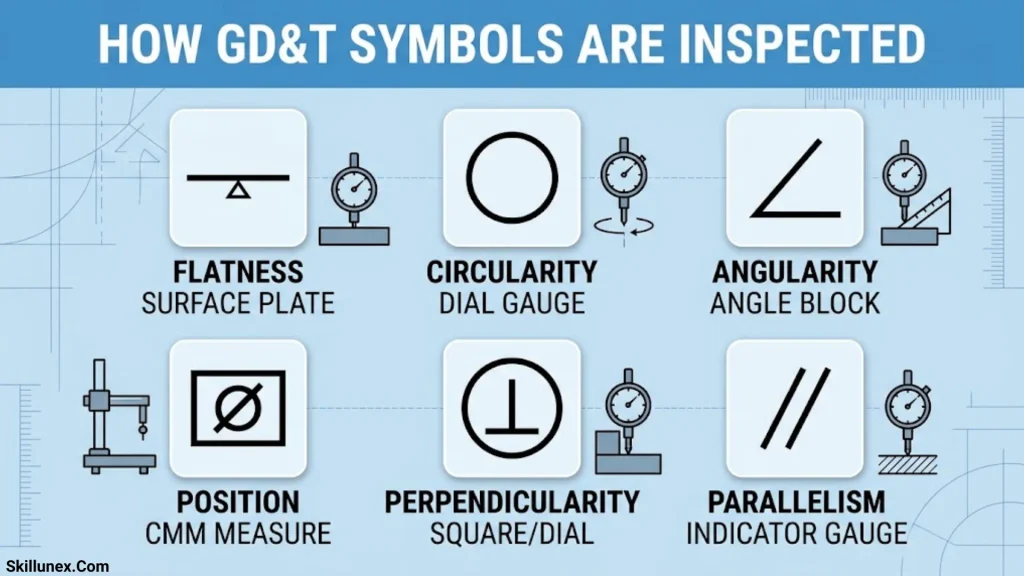
Inspection methods should be selected according to the geometric characteristic, tolerance value, feature accessibility, and governing standard.
Coordinate Measuring Machine (CMM)
A coordinate measuring machine collects coordinate data from a component to evaluate specified dimensions and geometric characteristics. CMMs are commonly used for complex parts and features that require precise spatial measurement.
The inspection program must apply the correct alignment, datum setup, sampling strategy, and evaluation rules.
Dial Indicator
Dial indicators are frequently used for runout checks and certain alignment measurements. A part may be rotated around its datum axis while the indicator measures surface variation.
The setup must establish the appropriate reference axis and contact location.
Surface Plate and Height Gauge
A surface plate and suitable measuring tools can be used for certain inspection tasks involving flatness, height, and dimensional relationships. Whether these tools are sufficient depends on the required tolerance and the applicable inspection method.
Optical Measurement Systems
Optical systems can measure visible profiles, edges, and small features without necessarily contacting the surface. They may be useful for precision components, thin parts, and features that are difficult to reach with conventional probes.
Choosing the Correct Inspection Method
Before inspection, confirm:
- Which geometric characteristic is specified.
- Which features and surfaces are controlled.
- Which datums establish the reference frame.
- Whether material condition modifiers apply.
- Which standard and edition govern interpretation.
- Whether the measurement method can reliably verify the stated requirement.
A measurement of one related dimension does not automatically verify a geometric tolerance.
Common GD&T Interpretation Mistakes
GD&T can be misunderstood when symbols are memorized without considering their tolerance zones, datum references, and functional intent.
Confusing Size With Position
A hole can satisfy its diameter limits but still be incorrectly located. Size and position are separate requirements and must be evaluated independently when both are specified.
Confusing Circularity With Cylindricity
Circularity evaluates the roundness of individual cross-sections. Cylindricity evaluates the overall form of a cylindrical surface. Choosing between them depends on whether the requirement concerns local roundness or the complete cylindrical form.
Confusing Runout With Position
Position controls the location of a feature relative to a defined reference system. Runout controls surface variation relative to a datum axis during rotation. The two controls are not interchangeable.
Using the Wrong Datum Reference
Datums should reflect how the part functions, mates, or is inspected. A datum that does not represent the functional setup may lead to an inappropriate interpretation of the geometric requirement.
Assuming Every Tolerance Requires a Datum
Some form controls, such as flatness and circularity, generally do not require datum references. Other controls, such as parallelism, perpendicularity, and position, commonly rely on datums.
Ignoring the Governing Standard
ASME and ISO standards may use similar symbols but differ in some rules and interpretations. Never assume a drawing follows a particular standard without checking its notes or documentation.
Applying Tolerances That Are Too Tight
Unnecessarily restrictive tolerances can increase machining time, inspection costs, scrap, and production complexity. Each tolerance should be justified by the component’s functional requirements and manufacturing capabilities.
Tips for Learning GD&T Symbols and Meaning
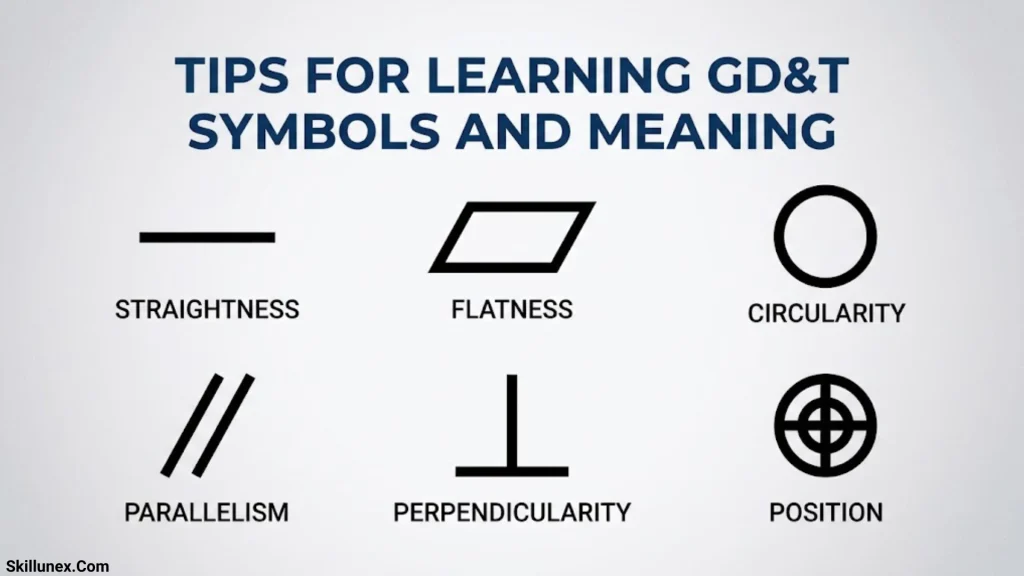
A structured learning approach can help beginners understand GD&T more effectively.
Start With the Five Main Categories
Learn form, profile, orientation, location, and runout first. Understanding these categories makes individual symbol definitions easier to remember.
Study Feature Control Frames
Practice identifying the geometric characteristic, tolerance value, modifiers, and datum references in a feature control frame. This helps turn symbol recognition into drawing interpretation.
Understand Datum Reference Frames
Learn how primary, secondary, and tertiary datums establish a reference system. This is particularly important for position and orientation tolerances.
Practice With Real Engineering Drawings
Review drawings of shafts, brackets, plates, housings, and hole patterns. Identify which requirements control size, form, orientation, and location.
Connect Symbols to Measurement Methods
Study how CMMs, indicators, optical systems, and other tools verify different geometric characteristics. Understanding inspection makes the purpose of each tolerance clearer.
Learn the Applicable Standard
Use the ASME or ISO standard required by your workplace or industry. Authoritative standards and qualified GD&T training are especially valuable when interpreting complex or safety-critical drawings.
Frequently Asked Questions About GD&T Symbols and Meaning
What does GD&T stand for?
GD&T stands for Geometric Dimensioning and Tolerancing. It is a standardized engineering system used to specify acceptable geometric variation in manufactured parts.
How many GD&T symbols are there?
Traditional GD&T reference charts commonly list 14 geometric characteristic symbols. However, the number depends on the standard and edition. For example, ASME Y14.5-2018 removed concentricity and symmetry as geometric characteristics.
What are the five main categories of GD&T?
The five commonly taught categories are form, profile, orientation, location, and runout. Each category controls a different type of geometric requirement.
What is the most commonly used GD&T symbol?
Position is one of the most widely used GD&T controls, especially for holes, pins, and patterns of features. It helps ensure that features are located correctly for assembly. The best control depends on the specific design requirement.
What is the difference between GD&T and dimensional tolerancing?
Dimensional tolerancing controls permitted variation in sizes and distances. GD&T controls geometric characteristics such as form, orientation, location, profile, and runout. Engineering drawings frequently use both.
What is a datum in GD&T?
A datum is a theoretically exact reference used to establish a reference frame for evaluating geometric requirements. Datum features on a physical part help establish that reference according to the applicable standard.
What does MMC mean in GD&T?
MMC means maximum material condition. It represents the size condition containing the greatest amount of material. When a geometric tolerance is specified at MMC where permitted, bonus tolerance may be available as the feature departs from MMC.
What is the difference between circularity and runout?
Circularity controls the roundness of individual circular cross-sections without requiring a datum axis. Runout controls variation relative to a datum axis as the part rotates. The controls address different geometric requirements.
Are concentricity and symmetry still used in GD&T?
They may appear on older drawings and in legacy reference material. However, ASME Y14.5-2018 removed concentricity and symmetry as geometric characteristics. Any existing requirement should be interpreted using the standard and edition specified on the drawing.
Can GD&T be used in CNC machining?
Yes. GD&T is widely used in CNC machining to control features such as hole positions, surface flatness, perpendicularity, parallelism, and runout. It helps machinists and inspectors understand which geometric requirements must be achieved and verified.
Which GD&T standard should beginners learn?
Beginners should learn the standard used by their employer, customers, or industry. ASME Y14.5 is widely used in the United States, while ISO GPS standards are common internationally. Because their rules are not identical, it is important to study the correct standard.
Conclusion
Understanding GD&T symbols and meaning is essential for interpreting engineering drawings, manufacturing precision components, and maintaining consistent product quality. Each geometric characteristic controls a specific requirement, from straightness and flatness to position, profile, and runout.
The most effective way to learn GD&T is to understand the five main categories, study feature control frames, learn how datum reference frames work, and connect each symbol to a practical manufacturing or inspection example. It is also important to recognize differences between ASME and ISO standards and to treat legacy controls such as concentricity and symmetry appropriately.
When GD&T is applied correctly, it improves communication between designers, machinists, and inspectors, supports reliable assembly, and helps ensure that manufactured parts meet their intended functional requirements.

Isla Kensington
I’m Isla Kensington, a writer with a passion for research, culture, nature, and the fascinating meanings behind everyday things. I enjoy taking topics that may seem simple at first and discovering the history, facts, and ideas that make them more interesting.
I write with readers in mind. My aim is to provide clear explanations, useful information, and interesting details without making a topic unnecessarily complicated.
I believe learning should feel like discovering something rather than simply reading facts. That philosophy guides the content I create and the topics I choose to explore.
## Books by Isla Kensington
* Symbols Around the World: A Guide to Meaning & Culture
* Nature’s Beautiful Places: Lakes, Landscapes & Natural Treasures