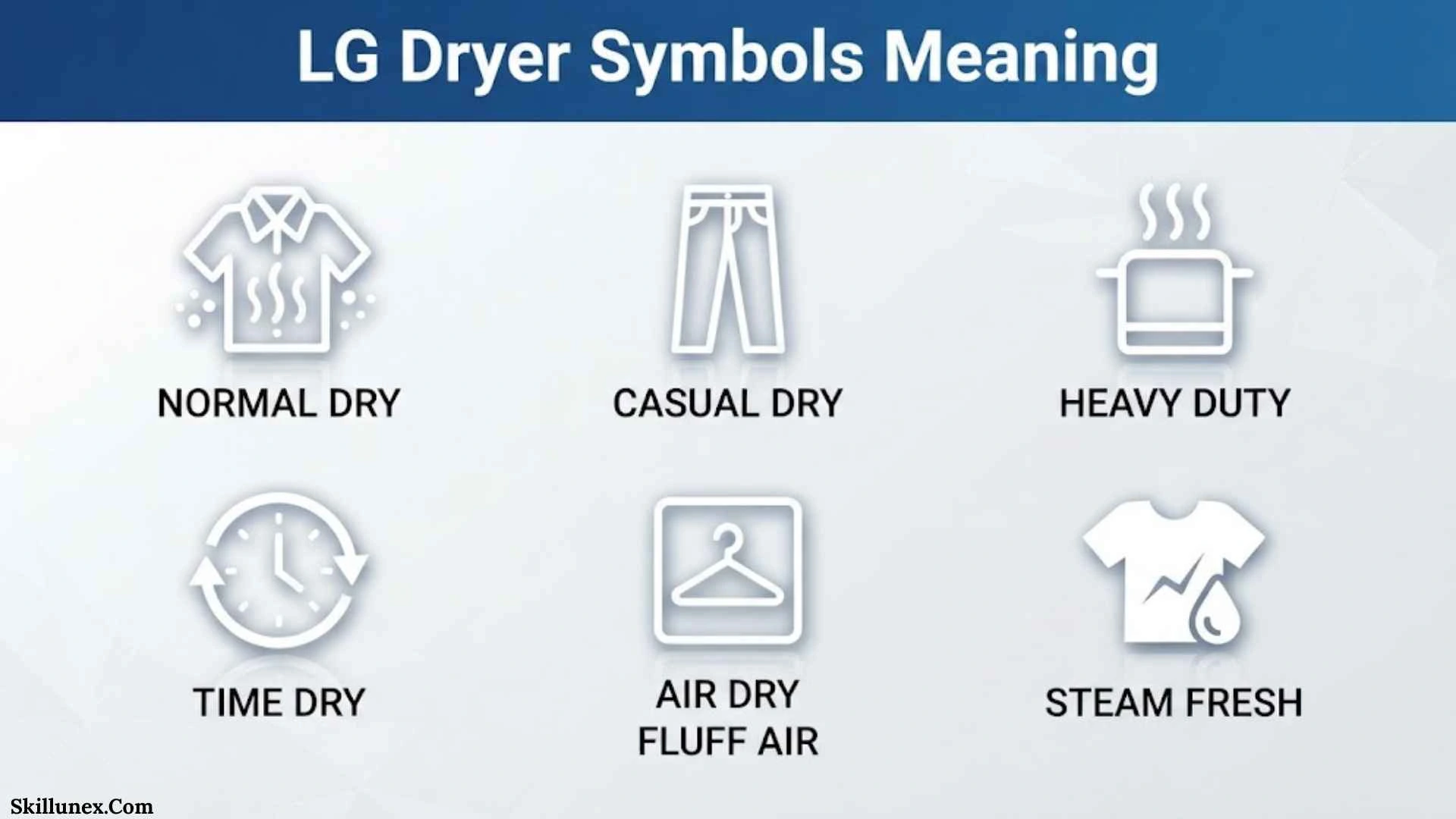
If you are searching for LG dryer symbols meaning, you probably have an icon on your dryer that you do not recognize. You may see a filter symbol, water-container icon, drying indicator, cooling symbol, iron icon, child-lock symbol, or another small light and wonder whether it is a warning or simply part of the selected cycle.
The good news is that most LG dryer symbols are easy to understand once you know what they represent. In this guide, I’ll explain the common LG dryer symbols, cycle indicators, drying levels, temperature settings, maintenance icons, and warning indicators so you can choose the right setting for your laundry.
You should also remember that LG uses different control panels and functions across its dryer models. A symbol on your LG dryer may therefore look different from one shown on another model. LG itself notes that button options and locations can vary by model.
LG Dryer Symbols Meaning
LG dryer symbols generally tell you one of four things: what the dryer is doing, which cycle or option is selected, what maintenance is needed, or whether a special function is active.
Here are the most common symbols you may encounter:
| LG Dryer Symbol Or Indicator | Meaning |
| Drying indicator | The dryer is in the drying stage |
| Cooling indicator | The dryer is cooling the load |
| Filter icon | Check or clean the lint filter |
| Water container icon | Empty the water container |
| Wrinkle Care icon | Wrinkle Care is active |
| Child Lock / CL | Control panel is locked |
| Iron icon | Clothes are ready for an ironing alert |
| Time icon/display | Shows drying time or remaining time |
| Wi-Fi icon | Smart connectivity is active or available |
| Door Lock icon | The door is locked |
| End indicator | The selected cycle has finished |
| Dotted circular movement | Wrinkle Care may be tumbling the clothes |
Not every LG dryer has every symbol in this table. Your model determines which icons and functions are available.
LG Dryer Cycle Symbols And What They Mean
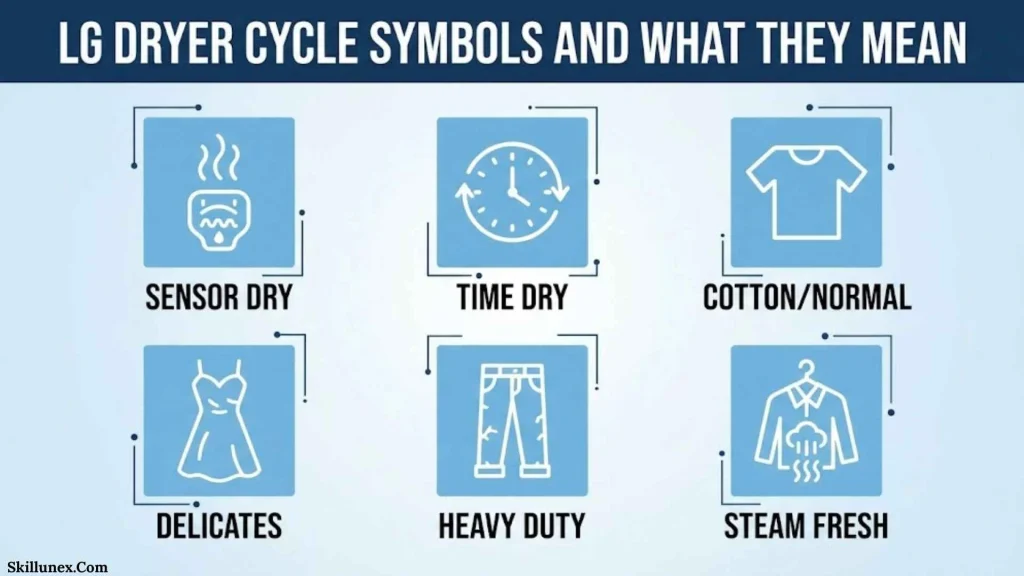
The cycle you choose has a direct effect on drying temperature, time, and how aggressively the clothes are tumbled. LG’s current cycle information includes options such as Normal, Heavy Duty, Bedding, Towels, Perm. Press, Delicates, Speed Dry, Air Dry, and other model-specific cycles.
Normal Dry Symbol
The Normal cycle is intended for everyday laundry and common fabrics that can safely be tumble dried.
You can use it for many ordinary clothing loads, but you should still check each garment’s care label before putting it into the dryer.
Heavy Duty Symbol
The Heavy Duty cycle is designed for durable, heavier items such as jeans and heavyweight fabrics.
Because this cycle can use a higher temperature, you should not automatically use it for every load.
Bedding Symbol
The Bedding symbol or cycle is designed for larger items such as comforters, pillows, and sheets.
If you are drying bulky bedding, make sure your dryer can safely handle the size and weight of the load.
Towels Symbol
The Towels cycle is designed for towels, heavy cottons, and similar absorbent items.
Towels normally retain more moisture than lightweight clothing, so a dedicated towel cycle can be more suitable than a short drying program.
Perm. Press Symbol
Perm. Press, or Permanent Press, is intended for permanent-press fabrics and synthetic items.
This cycle generally uses a gentler approach than heavy-duty drying and can be useful when your clothing label recommends a permanent-press or wrinkle-resistant cycle.
Delicates Symbol
The Delicates cycle is intended for more delicate laundry such as lingerie, blouses, and other items that require gentler drying.
You should always check the care label because some delicate fabrics should not be tumble dried at all.
Speed Dry Symbol
Speed Dry is designed for small loads that need to dry quickly.
You should not assume that a large or very wet load will dry properly on a short cycle. LG specifically describes Speed Dry as being for small loads.
Air Dry Symbol
Air Dry is a heat-free drying option on compatible models.
It can be useful for items that should not be exposed to normal dryer heat, including certain plastics or rubber items when the item’s care instructions permit the use of the dryer. LG lists Air Dry as a heat-free cycle.
Rack Dry Symbol
Rack Dry is used with a dryer rack rather than normal tumbling.
It can be useful for items such as wool sweaters, silk items, lingerie, shoes, stuffed animals, or other items that should be dried without normal tumbling, provided the care instructions allow it.
Steam Fresh Symbol
Some LG dryers include Steam Fresh, which is designed to refresh certain items and help reduce light wrinkles.
The exact fabrics and load types that can be used with Steam Fresh depend on your model, so check your owner’s manual before using it.
Steam Sanitary Symbol
Some models include Steam Sanitary, a steam-based cycle intended for specific laundry and bedding applications.
Do not assume that every fabric is suitable for this cycle. LG notes that some specialized cycles should not be used with delicate fabrics.
LG Dryer Drying Stage And Cooling Symbols
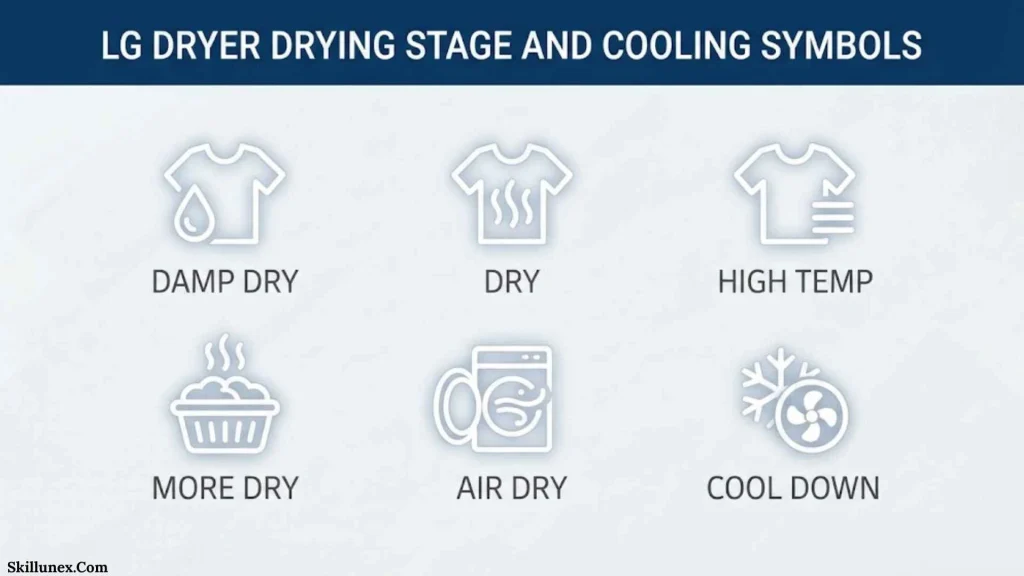
One of the most confusing things about an LG dryer is seeing the machine continue operating after you think drying should be finished.
This is often completely normal.
Drying Symbol
When the Drying indicator is illuminated, the dryer is in the drying portion of the cycle.
The drum may be rotating while heated air is being used to remove moisture from your clothes.
Cooling Symbol
The Cooling indicator means the dryer is in the cooling portion of the cycle.
You may still hear the drum turning even though the main heated drying stage has ended. LG explains that drying and cooling are normal parts of the cycle, and a cooling indicator does not necessarily mean there is a problem.
Drying And Cooling Lights Together
If you see the status change between drying and cooling, do not immediately assume your LG dryer is malfunctioning.
The dryer can move through different stages automatically. Your model may show these stages using separate lights or symbols.
LG Dryer Dry Level Symbols
The Dry Level setting controls how dry you want your clothes when the cycle ends.
The exact choices vary by model, but you may encounter settings such as:
- Damp
- Less Dry
- Normal
- More Dry
- Very Dry
- Extra Dry
- Iron Dry
Damp Dry
A damp-dry setting leaves some moisture in the clothing.
This can be useful when you want to remove clothes before they become completely dry, such as when you plan to iron them.
Normal Dry
Normal dry is intended for everyday laundry when you want the load to finish at a standard dryness level.
Very Dry Or Extra Dry
These settings provide a higher level of dryness.
You should use them only when appropriate for the fabric because excessive drying can contribute to unnecessary heat exposure and wear.
Iron Dry
An iron-dry setting leaves clothing slightly damp so it can be easier to iron.
Some LG models also have an Ironing Alert feature. When it is active, an iron icon can illuminate and an alarm can tell you when selected clothes are ready to remove for ironing.
LG Dryer Temperature Symbols
Temperature settings tell you how much heat the dryer will use.
High Temperature Symbol
High heat is generally intended for durable fabrics that can safely tolerate higher temperatures.
Heavy-duty cycles may use higher temperatures, but you should always follow the garment’s care label.
Medium Temperature Symbol
Medium heat provides a middle setting for fabrics that can tolerate some heat but may not be suitable for the highest temperature.
Low Temperature Symbol
Low heat is a gentler choice for appropriate fabrics.
If your clothing label specifies low heat, selecting a high-temperature cycle can be a poor choice even if the clothes seem like ordinary laundry.
No Heat Symbol
A no-heat or air-dry setting uses air without the normal heated drying process.
LG lists Air Dry as a heat-free option on compatible dryers.
LG Dryer Filter Symbol Meaning
The filter symbol is one of the most important LG dryer indicators to understand.
It generally means you should check the lint filter.
On some LG condenser models, the lint-filter indicator lights at the beginning of a cycle as a reminder. LG also states that the indicator can appear if the filter needs cleaning or is missing.
Is The LG Filter Symbol An Error?
Usually, no.
LG specifically explains that the Check Filter indicator is a reminder rather than an error code. It reminds you to clean the lint filter before use.
If the filter is missing on certain models, however, the dryer may not operate.
How Often Should You Clean The Filter?
You should check and clean the lint filter after every drying cycle.
A dirty filter can restrict airflow and contribute to longer drying times. LG also emphasizes regular lint-filter cleaning for drying performance and safety.
LG Dryer Water Container Symbol Meaning
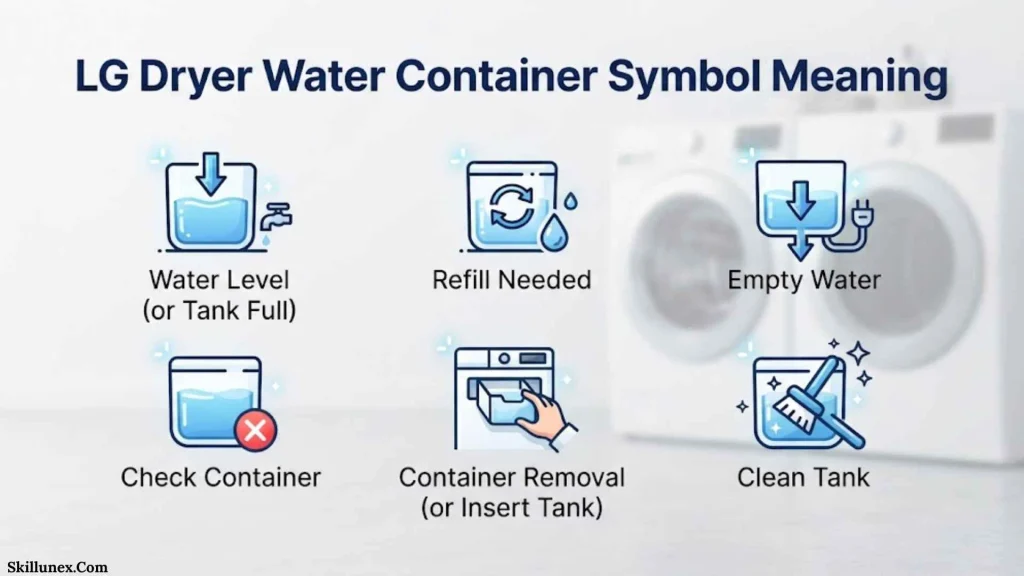
If your LG dryer uses a water-collection container, you may see a water container or Empty Water symbol.
This means the dryer has collected moisture and the container needs attention.
What Should You Do When The Water Symbol Appears?
First, stop and check the water container.
If it is full, empty it and restart the dryer as directed by your model. LG says that when an Empty Water indicator appears, the dryer may stop because it cannot continue draining properly.
Some dryers can instead be connected to a drain hose, depending on the model and installation.
Why Does The Water Symbol Keep Coming Back?
If you empty the container but the warning continues, there may be a drainage or installation issue.
Check that the dryer is properly level and that any drain hose is not kinked or incorrectly positioned. If the problem continues, consult the model-specific manual or arrange service.
LG Dryer Wrinkle Care Symbol Meaning
The Wrinkle Care symbol means that the wrinkle-prevention function has been selected or is currently operating.
This function is particularly useful when you cannot remove clothes immediately after the normal cycle ends.
How Does Wrinkle Care Work?
On compatible LG dryers, Wrinkle Care periodically tumbles the clothes after the main cycle to help prevent wrinkles.
LG explains that some models periodically tumble for up to three hours, while the exact behavior varies by model.
Why Is My LG Dryer Still Turning After The Cycle Ends?
If you see an End indication alternating with a dotted circular movement, Wrinkle Care may be active.
This does not necessarily mean your dryer has failed to stop. The dryer may be periodically tumbling the clothes to reduce wrinkles.
If you open the door, Wrinkle Care may stop on compatible models.
LG Dryer Child Lock Symbol Meaning
The Child Lock symbol or CL display means that the control panel lock is active.
It is not normally an error code.
Why Is CL Showing On My LG Dryer?
When Child Lock is enabled, the control buttons can become disabled so settings cannot be accidentally changed.
LG specifically states that CL or Child Lock indicates that the Child Lock feature is active rather than representing a normal error condition.
How Do You Turn Off Child Lock?
The exact button combination depends on your LG dryer.
Look for a button marked Child Lock, Control Lock, or a lock symbol. On many models, you need to press and hold the indicated button or button combination for several seconds.
If that does not work, use the instructions for your exact model rather than repeatedly pressing random buttons.
LG Dryer Iron Symbol Meaning
If you see an iron symbol, it may be related to the Ironing Alert feature on compatible LG models.
The function can notify you when certain clothes are not completely dry and are ready to be removed for ironing.
LG explains that an iron icon can illuminate while the alert sounds for about one minute.
This is useful if you want to iron specific garments while they still contain a small amount of moisture.
LG Dryer Wi-Fi Symbol Meaning
If you have an LG smart dryer, you may see a Wi-Fi symbol.
This generally relates to the dryer’s wireless connection and smart functions.
Depending on the model and region, an LG smart dryer may connect with the LG ThinQ ecosystem. The exact functions available to you depend on the dryer model and supported features.
If the Wi-Fi icon is flashing or does not connect, check the setup instructions for your model rather than assuming that the dryer itself has a mechanical problem.
LG Dryer Door Lock Symbol Meaning
A door-lock symbol indicates that the dryer door is locked or that the control system is preventing it from being opened at that moment.
You should never force the door open.
Wait for the appropriate indicator to turn off and follow your model’s instructions. If the door remains locked after the cycle has completely ended and the normal release conditions have been met, consult the troubleshooting section of your manual.
LG Dryer Time Symbols And Display Meanings
Your LG dryer display can show more than just a countdown.
Depending on the model, it may display:
- Estimated remaining time
- Set drying time
- Cycle status
- End indication
- Error codes
- Child Lock
- Maintenance reminders
- Special function indicators
Why Does The Drying Time Change?
If you use a sensor-based drying cycle, the displayed time can change as the dryer detects moisture.
This is normal.
LG explains that drying time can increase when the filter is clogged, the load contains fabrics of different thicknesses, the selected cycle does not suit the load, or other conditions affect moisture sensing.
Why Did My LG Dryer Finish Earlier Than The Displayed Time?
A sensor-dry cycle can finish before the original estimated time when the clothes reach the selected dryness level.
LG notes that the displayed time is an estimate and that the cycle can end according to the selected dry-level or drying-mode setting.
LG Dryer Sensor Dry Symbol Meaning
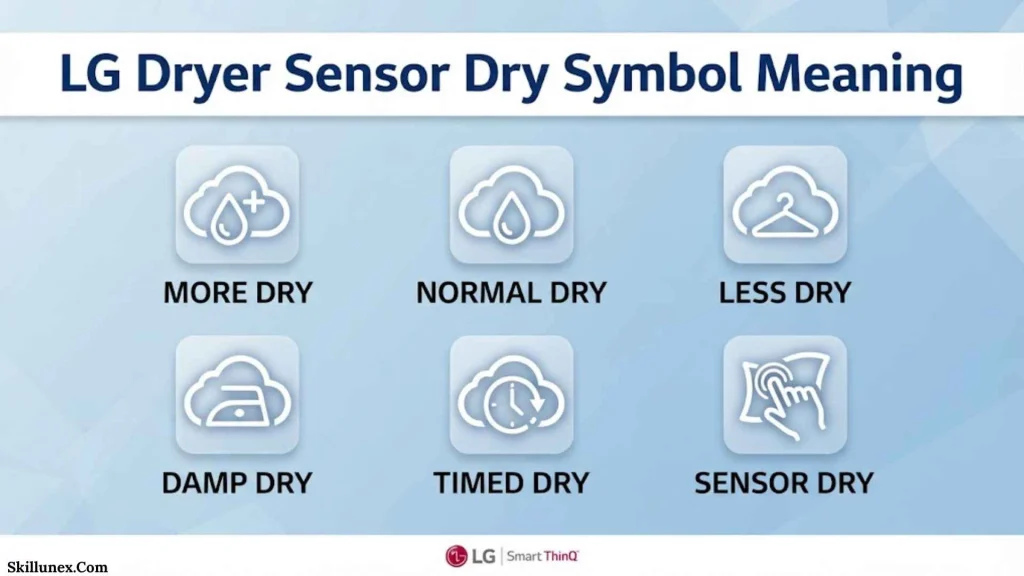
Sensor Dry means the dryer uses sensors to help determine how much moisture remains in the load.
This differs from a simple timed cycle.
Instead of saying, “Run for exactly this many minutes,” the dryer can adjust the process based on the condition of the laundry.
Sensor Dry Vs Timed Dry
Sensor Dry is useful when you want the dryer to stop according to the selected dryness level.
Timed Dry is useful when you want to specify the approximate amount of drying time yourself.
LG describes Manual Dry, Timed Dry, and Speed Dry options across its dryer models, although the available names and controls vary.
LG Dryer Symbols On Clothing Labels
There is an important difference between symbols on your LG dryer and symbols on your clothing labels.
Your dryer symbols tell you what the appliance is doing or which setting you have selected. The symbols on clothing labels tell you how the manufacturer recommends caring for that particular garment.
Tumble Dry Symbol
A square containing a circle is commonly used to indicate tumble drying.
If the symbol has additional markings, those markings can indicate the appropriate heat level.
Low Heat Tumble Dry Symbol
A tumble-dry symbol with a low-heat indication means the garment should be dried using low heat.
If your LG dryer allows you to select a low-temperature option, that can be the appropriate setting when it matches the garment’s instructions.
Do Not Tumble Dry Symbol
A tumble-dry symbol crossed out or marked as prohibited means you should not put that garment in a tumble dryer.
In this situation, selecting Delicate, Air Dry, or Low Heat does not automatically make tumble drying safe. If the care label says not to tumble dry, follow the label.
Why Clothing Symbols Matter
LG recommends checking the fabric-care labels to choose an appropriate cycle. The company specifically distinguishes normal, permanent press, gentle/delicate, and do-not-tumble-dry care instructions.
LG Dryer Symbols By Fabric Type
Choosing the correct cycle becomes easier when you start with the fabric rather than the symbol alone.
| Laundry Type | Possible LG Setting | What To Consider |
| Everyday cotton | Normal | Check care label |
| Towels | Towels | Suitable for heavier cotton items |
| Jeans | Heavy Duty | Designed for durable heavy items |
| Synthetic clothing | Perm. Press | Check temperature recommendation |
| Delicate clothing | Delicates | Follow garment instructions |
| Small load | Speed Dry | Designed for smaller loads |
| Heat-sensitive items | Air Dry | Use only when appropriate |
| Bedding | Bedding | Check load capacity |
| Wool or rack-safe items | Rack Dry | Use rack where appropriate |
These are general examples. Your exact LG model may use different cycle names or offer different options.
What LG Dryer Symbol Should You Use For Different Clothes?
If you are unsure which setting to choose, start with the clothing label and then match it to your dryer.
For Everyday Shirts And Pants
Use an appropriate everyday cycle such as Normal when the care label permits tumble drying.
For Towels
Use the Towels cycle if your LG model has one.
For Jeans
Heavy Duty may be appropriate for durable jeans when the care label permits tumble drying.
For Delicate Clothes
Use Delicates or another gentle setting when the garment is approved for tumble drying.
For Clothes You Need To Iron
An Iron Dry or Ironing Alert feature may be useful on compatible models.
For Items That Should Not Receive Heat
Air Dry may be suitable for certain items, but you should first confirm that the item can safely be placed in the dryer.
For Items That Should Not Tumble
Do not use a normal tumble cycle if the clothing label says Do Not Tumble Dry.
Why Is My LG Dryer Taking Too Long To Dry?
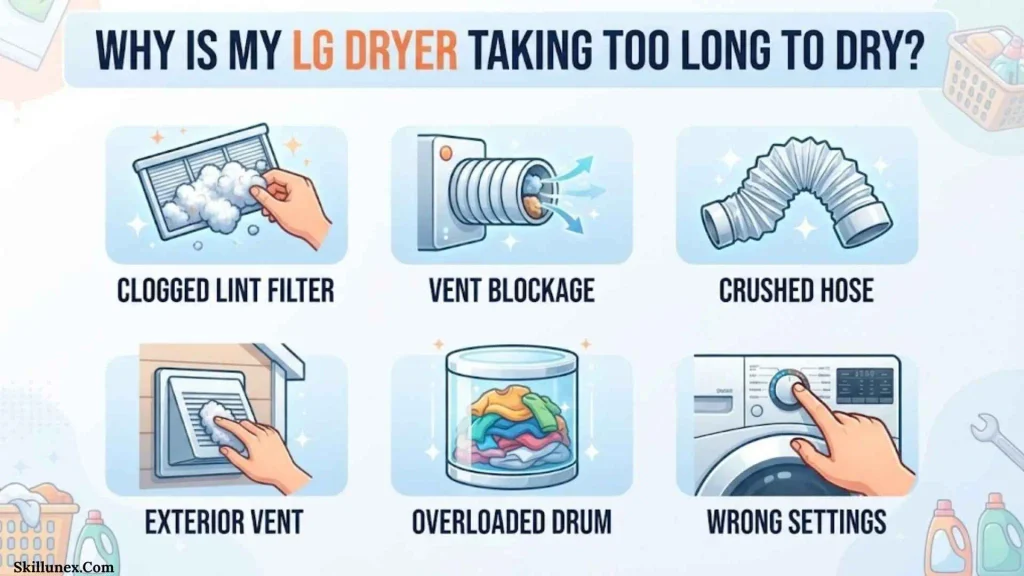
Sometimes people search for dryer symbols because a symbol appears at the same time their dryer seems to be taking too long.
A longer drying time does not always mean the symbol is an error.
Check The Lint Filter
A clogged filter can restrict airflow and contribute to longer drying times.
Clean the filter according to your model’s instructions.
Check The Load Size
An overloaded drum can prevent clothes from moving freely and may interfere with effective drying.
LG recommends loading items loosely and notes that excessive loads can affect drying and contribute to wrinkles.
Separate Heavy And Lightweight Items
Heavy towels and lightweight shirts do not dry at the same rate.
When you mix very different fabrics, the sensor may detect moisture differently, and some items can remain damp after lighter pieces have already dried. LG identifies mixed fabric weights as one possible reason for longer drying.
Check The Selected Cycle
A cycle designed for a particular load may work better than using a short or inappropriate cycle.
For example, a large bedding load should not automatically be treated like a small load of shirts.
LG Dryer Warning Symbols Vs Error Codes
Not every light or message means your dryer has a fault.
This distinction is important.
Normal Status Indicators
Examples include:
- Drying
- Cooling
- Wrinkle Care
- End
- Check Filter
- Child Lock
These can indicate normal operation or a reminder rather than a mechanical failure. LG specifically identifies Check Filter, Child Lock, cooling/drying lights, and Wrinkle Care as indicators that should not automatically be treated as error codes.
Actual Error Codes
A separate error code may indicate an issue that requires troubleshooting.
If you see a code such as a temperature, airflow, door, or other fault code, write down the exact code. Then check the troubleshooting information for your model.
Do not assume that every unfamiliar display is an error.
What To Do When An LG Dryer Symbol Appears
If you see an unfamiliar symbol, use this simple process:
- Look at the symbol carefully. Determine whether it looks like a filter, water container, lock, iron, Wi-Fi, drying, or another indicator.
- Check the current cycle. Some symbols appear because you selected a particular cycle or option.
- Check the clothing label. Make sure the selected temperature and drying method are suitable.
- Check the lint filter. Clean it if necessary.
- Check the water container. If your dryer has one, empty it when indicated.
- Look for an error code. A separate code can provide more specific information.
- Find your model number. Use the manual for your exact dryer when the symbol remains unclear.
- Do not force the door or ignore a serious warning. Follow the model-specific safety instructions.
Why Your LG Dryer Symbol May Look Different
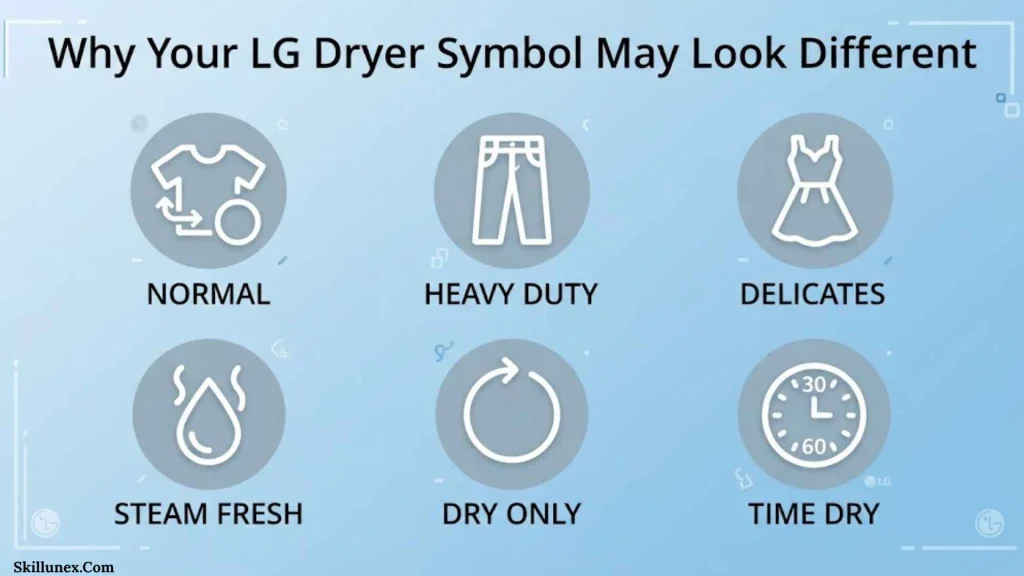
One of the biggest weaknesses of generic LG dryer symbol guides is that they can make every LG dryer appear identical.
They are not.
LG has different dryer models, control panels, cycles, regional versions, and technologies. Some models have condenser-related indicators, while others may have different ventilation or smart features. Even the same function can appear in a different place on the control panel.
That is why you should treat this guide as a general reference rather than a replacement for your specific owner’s manual.
If you send me your LG dryer model number and a photo of the symbol, I can identify the symbol more precisely.
Frequently Asked Questions About LG Dryer Symbols
What Does The Filter Symbol Mean On An LG Dryer?
The filter symbol generally reminds you to check or clean the lint filter. On some models, the indicator also appears if the filter is missing. It is usually a maintenance reminder rather than an error.
What Does The Water Symbol Mean On An LG Dryer?
The water-container symbol generally means the collected water needs to be emptied on models that use a water container. If an Empty Water message appears during drying, the dryer may stop until the issue is addressed.
What Does The Cooling Symbol Mean On An LG Dryer?
The cooling symbol means the dryer is in the cooling stage of its cycle. Seeing the cooling indicator is normally part of regular operation and does not automatically mean the dryer has a problem.
What Does The CL Symbol Mean On An LG Dryer?
CL normally means Child Lock or Control Lock is active. It is not normally an error code. The exact method for turning it off depends on your LG model.
Why Is My LG Dryer Showing The Wrinkle Care Symbol?
The Wrinkle Care symbol means the wrinkle-prevention function has been selected or is operating. The dryer may periodically tumble the clothes after the main cycle has finished.
What Does The Iron Symbol Mean On An LG Dryer?
On compatible LG models, the iron symbol can indicate the Ironing Alert function. It can notify you when selected clothing is ready to be removed for ironing while still slightly damp.
Why Is My LG Dryer Still Running After It Says End?
If Wrinkle Care is active, the dryer can periodically tumble the load after the main drying cycle. An End indication alternating with a circular dotted display can indicate that Wrinkle Care is operating.
Why Does My LG Dryer Time Keep Changing?
Sensor-dry cycles can adjust the estimated time according to moisture conditions. A clogged filter, mixed fabric thicknesses, an unsuitable cycle, or other conditions can affect the drying time.
Why Did My LG Dryer Stop Before The Time On The Display?
The displayed time can be an estimate on sensor-based cycles. If the clothes reach the selected dryness level earlier, the dryer can finish before the original estimated time.
Can I Ignore The LG Check Filter Symbol?
You should not ignore it. Check and clean the lint filter before using the dryer. Regular filter cleaning helps maintain airflow and drying performance and is an important safety practice.
Can I Use High Heat For Every Load?
No. You should select a temperature appropriate for the fabric and follow the garment’s care label. Some fabrics can be damaged by excessive heat.
Does Every LG Dryer Have The Same Symbols?
No. LG dryer symbols and controls vary between models. Some cycles and indicators are available only on particular models.
How Can I Find The Exact Meaning Of A Symbol On My LG Dryer?
Find the model number on your dryer and use the owner’s manual or LG support information for that specific model. If you have a photo of the symbol, you can also compare its shape with the model-specific control panel.
Conclusion
Understanding LG dryer symbols meaning can help you choose the right drying cycle, recognize normal operation, and respond correctly when your dryer needs attention. Symbols such as Drying, Cooling, Check Filter, Water Container, Wrinkle Care, Child Lock, Ironing Alert, and Wi-Fi each provide different information, but not every LG dryer includes the same icons.
The most important thing I want you to remember is that the symbol alone should not determine your drying choice. Check your clothing care label, consider the fabric and load size, keep the lint filter clean, and use the instructions for your exact LG dryer model. If a symbol still seems unclear, your model number is the best way to identify it accurately.

Isla Kensington
I’m Isla Kensington, a writer with a passion for research, culture, nature, and the fascinating meanings behind everyday things. I enjoy taking topics that may seem simple at first and discovering the history, facts, and ideas that make them more interesting.
I write with readers in mind. My aim is to provide clear explanations, useful information, and interesting details without making a topic unnecessarily complicated.
I believe learning should feel like discovering something rather than simply reading facts. That philosophy guides the content I create and the topics I choose to explore.
## Books by Isla Kensington
* Symbols Around the World: A Guide to Meaning & Culture
* Nature’s Beautiful Places: Lakes, Landscapes & Natural Treasures